Portfolio X-Ray
See the companies behind your ETFs and mutual funds—and how they overlap with stocks you own directly.
Three holdings. Hundreds of underlying companies.
Owning several funds doesn’t always mean owning different companies. Look inside supported ETFs and mutual funds to see how their holdings overlap with each other—and with stocks you own directly.
Explore MerryDiv plansPortfolio X-Ray is included with every MerryDiv subscription on web and iOS.
 AAPL$10,000
 VTI$50,000VOO$40,000
- AppleDirect + VTI + VOO$14,90014.9%
$10,000 direct + $2,500 in VTI + $2,400 in VOO
 NVIDIAVTI + VOO$5,8005.8%
 MicrosoftVTI + VOO$4,9004.9%
 TeslaVTI + VOO$1,5501.55%
- And many more…Other holdings through VTI + VOO$72,85072.85%
A preview of the companies behind your funds. Example fund weights are illustrative, not current allocations.
What could you discover?
Four questions Portfolio X-Ray can help answer about the companies behind your holdings.
Which company is your largest exposure?
See which identified company represents the biggest share of your selected portfolio after combining direct stocks and holdings through supported funds.
Where do your funds overlap?
Discover companies you own through several funds, sometimes alongside shares you hold directly. Trace each ownership source to understand the combined position.
How much is in your top ten companies?
See the share of your selected portfolio represented by its ten largest identified company exposures. Several funds can still concentrate your holdings in the same companies.
Which companies do you own only through funds?
Find company exposure you may not have realized you had—even when you have never bought those shares directly—and see which funds hold them for you.
These are examples of what you can explore, not findings about your portfolio. Insights depend on available fund holdings data; incomplete coverage can leave company exposure unidentified.
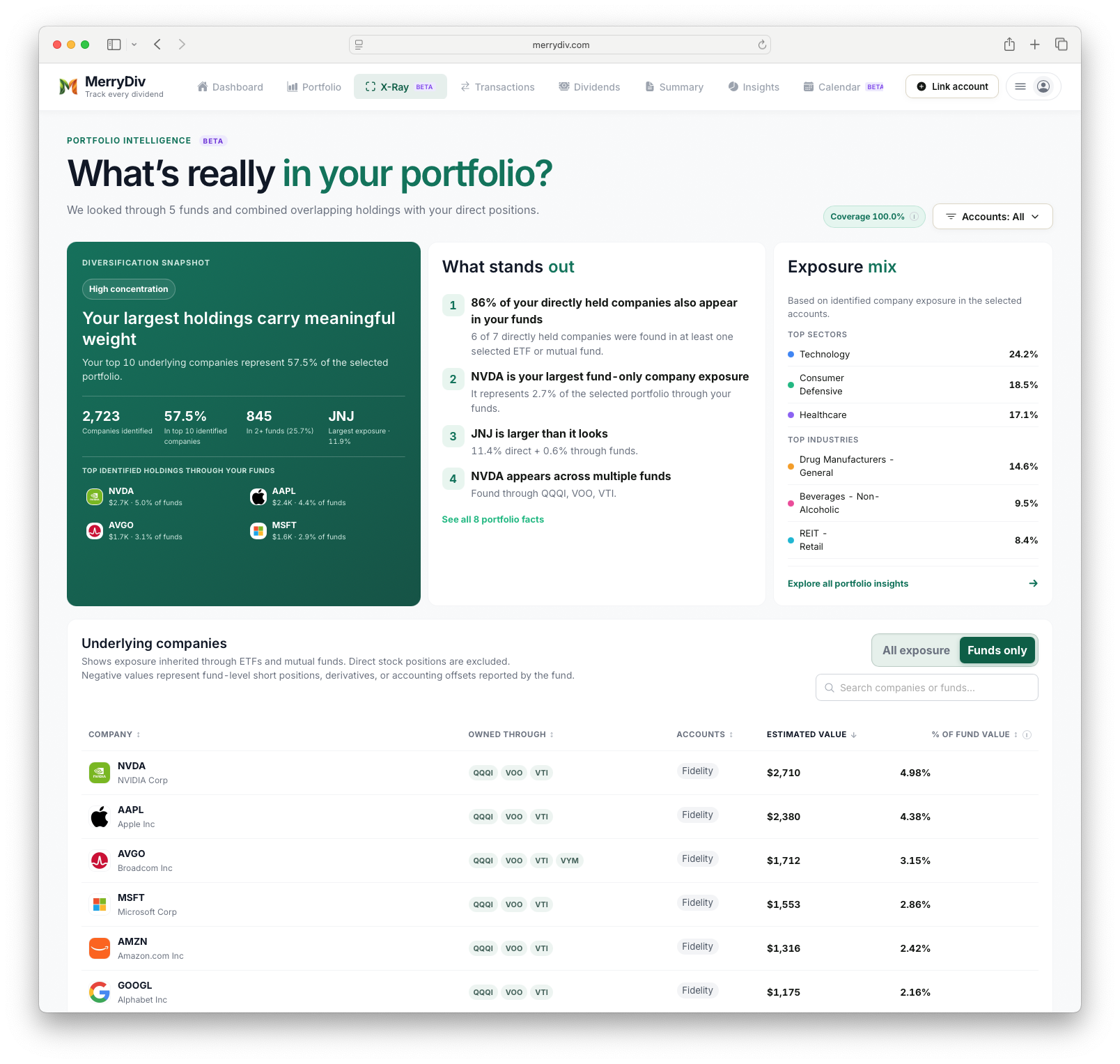
See your portfolio from the inside
Explore your largest company exposures, overlapping fund holdings, and the accounts behind them.
How is company exposure calculated?
Start with the shares you hold directly, then add the estimated value held through each supported fund.
Estimated company exposure = direct stock value + the sum of each fund’s value × its reported weight in that company.
In the illustrative portfolio above, Apple represents $10,000 in direct shares, plus 5% of $50,000 in VTI ($2,500) and 6% of $40,000 in VOO ($2,400).
$10,000 + $2,500 + $2,400 = $14,900 in Apple
Dividing $14,900 by the selected portfolio’s $100,000 total gives 14.9% company exposure. These fund weights are examples, not current VTI or VOO allocations.
In Funds only mode, direct shares are excluded and percentages use the selected funds’ total value. Missing composition stays in the total, so identified companies do not stand in for the whole portfolio.
Explore reported holdings for VTI and VOO, or learn how our portfolio tracker brings your accounts together.
A clearer picture—with the data in context
Fund composition is a reported snapshot, not a live inventory. Coverage and holdings dates vary, and some exposure may not yet be identified.
X-Ray helps you understand observable company concentration. It does not provide a complete risk assessment or tell you whether a portfolio is right for you. Missing composition remains included in portfolio totals, and holdings dates help you judge how current each fund’s breakdown is.
Portfolio X-Ray questions
Start with your dividend income. Explore what you own.
Track your holdings and dividend payments with MerryDiv. Portfolio X-Ray adds a view inside supported funds with every subscription.
Portfolio X-Ray is included with every MerryDiv subscription on web and iOS.