Dividend Tracker for International Investors
Your broker isn't on Plaid yet? Add holdings manually from any stock exchange in the world. MerryDiv's projections, forecasts, yield-on-cost, and dividend calendar work on the same core workflow whether you auto-sync or enter positions by hand (with the caveat that manual dividends are recorded in USD today — native-currency preservation is on the roadmap). Free plan supports unlimited manual holdings across unlimited accounts.
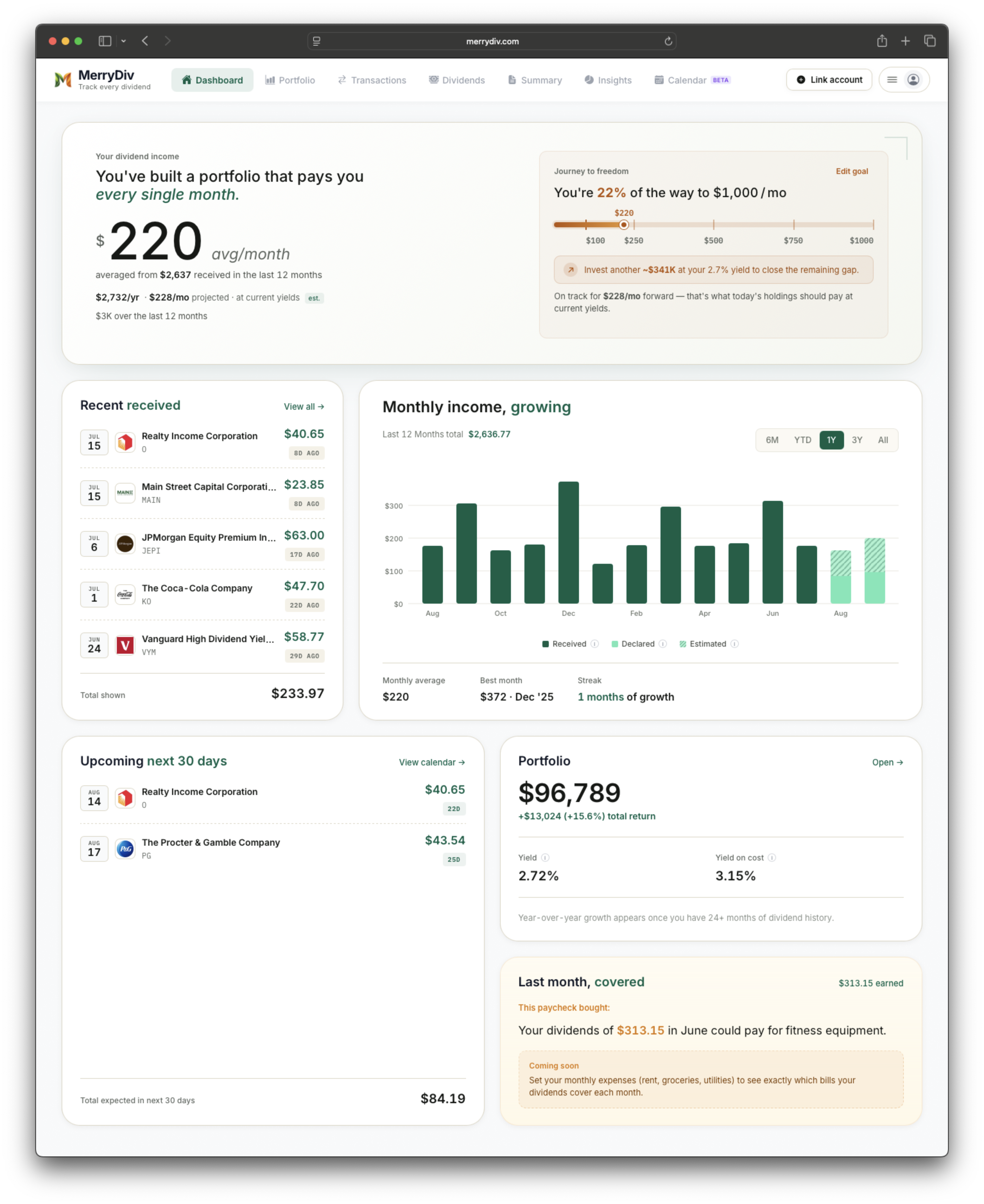
MerryDiv dashboard — works identically for manually-entered international holdings and Plaid-synced US accounts.
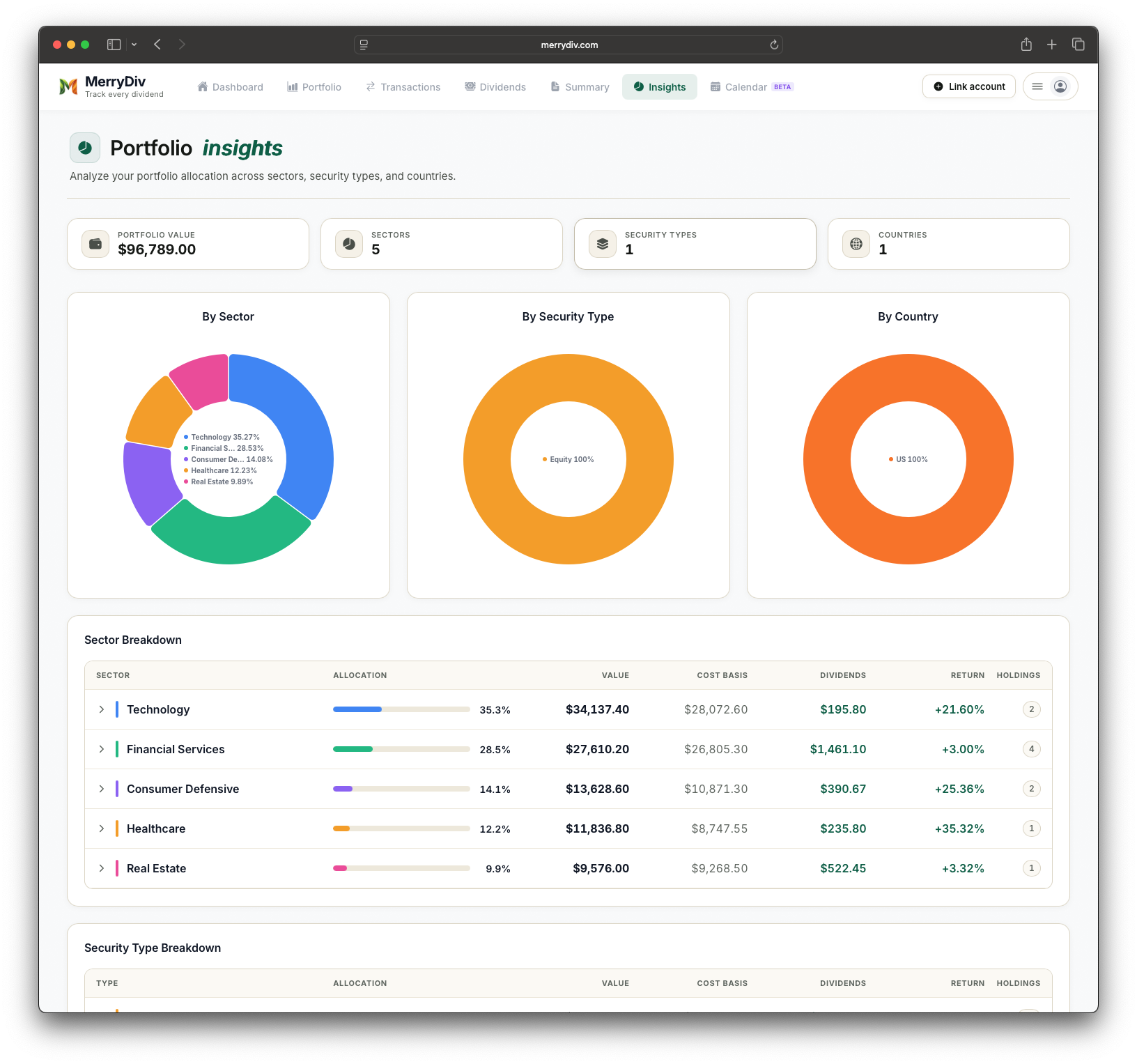
Insights — see your country and sector diversification across every exchange you invest in.
What MerryDiv syncs
- Unlimited manual holdings — no cap on stocks, ETFs, or accounts you can add
- Every major exchange — LSE (UK), ASX (Australia), TSX (Canada), Euronext (Amsterdam / Paris / Brussels), Deutsche Börse (Germany), SIX (Switzerland), HKEX (Hong Kong), TSE (Tokyo), SGX (Singapore), NSE/BSE (India), Bovespa (Brazil), JSE (South Africa)
- Any exchange, any ticker — enter dividend amounts converted to USD; native-currency preservation is on the roadmap
- Historical dividend backfill — enter past dividends by date to build your income history and yield-on-cost from your original purchase
- Cross-border support — US-listed ADRs, foreign-listed originals, and any combination sit in the same portfolio view
Common account types you can track
MerryDiv's manual-entry flow supports any account and any stock you can add by ticker — there's no broker allowlist or country restriction. Plaid auto-sync is US and Canada only today, so most international investors track everything as manual portfolios.
How international dividend tracking works in practice
MerryDiv's core is Plaid auto-sync, but Plaid's investment coverage is currently US and Canada only. For investors everywhere else (UK, EU, Australia, most of Asia, Latin America, Africa, parts of the Middle East), or for anyone whose broker just isn't Plaid-supported (Hargreaves Lansdown, AJ Bell, Freetrade, Trading 212 in the UK; DEGIRO in the EU; Selfwealth in Australia; Zerodha and Groww in India; Tiger Brokers in Asia), manual entry is the path. Two things worth flagging:
- Ticker recognition. When you add a holding by ticker, MerryDiv matches against Yahoo Finance's global ticker database. Most major exchanges resolve cleanly —
SHEL(Shell, LSE),BHP.AX(BHP Group, ASX),NESN.SW(Nestlé, Six),7203.T(Toyota, TSE). For obscure local names you may need to add the exchange suffix; if a ticker isn't recognized, you can still add the holding with a custom name. - Currency handling. Today MerryDiv records manual dividend amounts in USD. If your broker reports in GBP, EUR, JPY, AUD, or another currency, convert the amount at your preferred FX rate (payment-date or your own bookkeeping rate) before entering it. Native-currency preservation — where the £147.85 you type stays £147.85 and totals roll up in your base currency — is on the roadmap. If native FX is a blocker for you, Sharesight is the incumbent to consider until this ships.
Popular international dividend holdings (US ADRs)
Yield, frequency, and annual dividend for each. Click any row for full history and analysis.
Yields shown are snapshot values as of July 2026. Live figures on the stock page for each ticker. Educational examples only — not investment advice or a recommendation to buy any specific security.
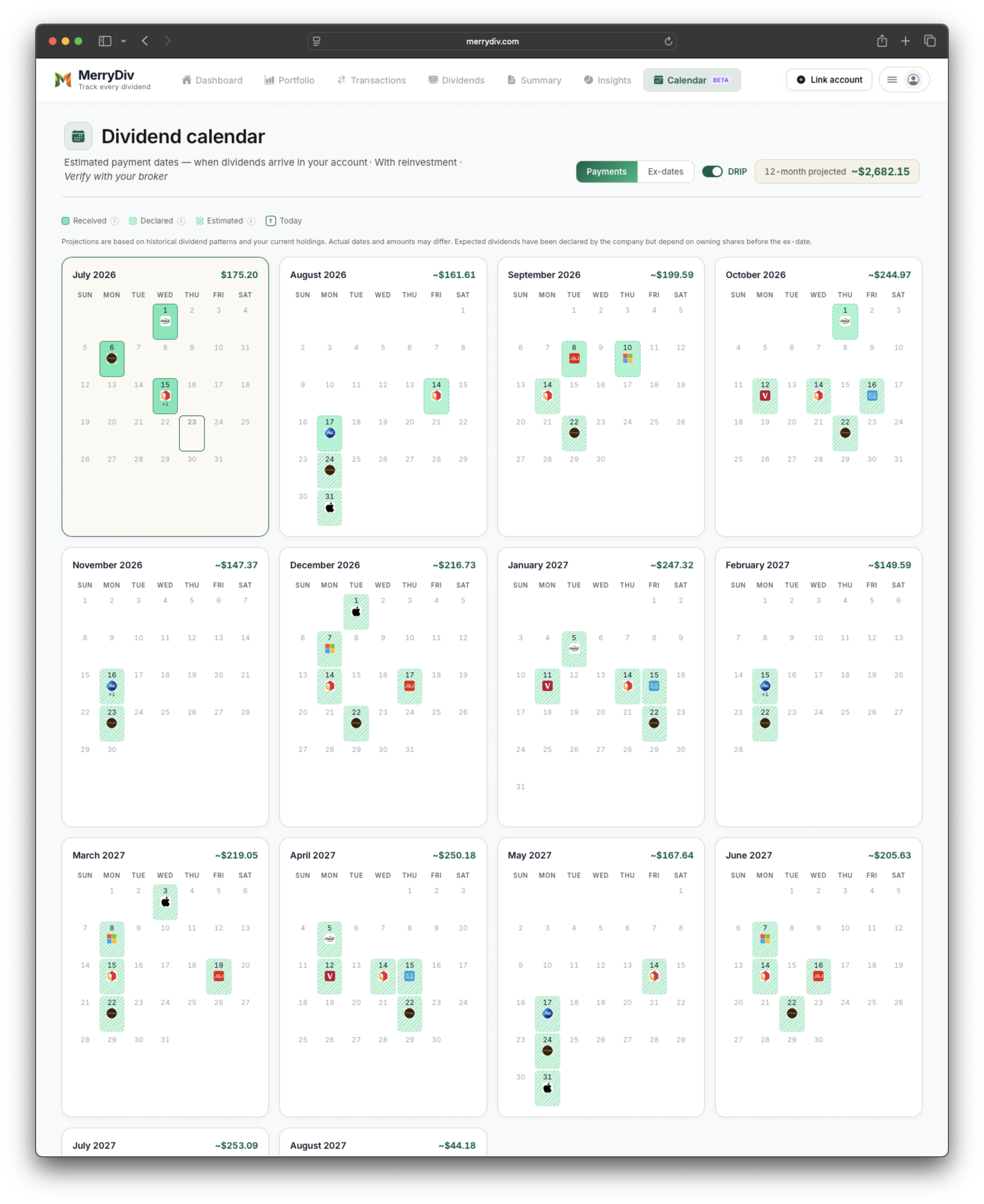
Dividend calendar — every ex-date and payment across your manually-tracked international holdings.
What manual dividend tracking actually gets you
There's a persistent assumption that "manual tracking = a spreadsheet". It doesn't have to be. Manual entry in MerryDiv runs the same core dividend-tracking workflow as auto-sync accounts — dividend calendar, forward income projection, yield-on-cost, sector breakdown, growth rate history, payout ratio safety indicators. The only difference is the data entry method. For most international investors that trade-off is worth making because the alternatives are:
- Excel or Google Sheets. Full manual work AND you build the projections and calendar yourself. Reasonable for 5 positions; painful at 20; a maintenance job at 40+.
- Broker-native dashboards. Fine for one account — but the moment you have positions at Selfwealth AND DEGIRO AND Interactive Brokers, they don't consolidate. Every insight lives in its own silo.
- Dedicated trackers with global coverage. Sharesight is the category leader here; Delta and Getquin also work. Free tiers typically cap the number of holdings you can track — check current pricing before committing.
How much time does manual entry actually take?
For a portfolio of 15-30 positions, initial setup is roughly 20-30 minutes: add each holding by ticker (Yahoo Finance handles most auto-fills), enter share count and cost basis, save. Ongoing maintenance is 2-5 minutes per month to record new dividends as they hit — or you can batch them at the end of each quarter. If you prefer to skip mid-year data entry entirely, you can enter your year's dividends in one sitting from your broker's annual statement.
What happens if your broker eventually joins Plaid?
Plaid gradually expands its coverage — Robinhood was added, then Fidelity's IRAs improved, then Vanguard's stability returned. If your broker joins later, you can migrate your manual portfolio to an auto-sync one without losing history: the transaction data you've already entered stays in place, and future dividends auto-import on top. Any manual data you entered acts as the "prior history" alongside the Plaid feed going forward.
Currency: what actually happens today (and what's coming)
Straight answer: MerryDiv's manual entry currently records dividend amounts and cost basis as USD. If your Shell dividend is £147.85, you enter the USD-converted amount (e.g. £147.85 × your chosen FX rate). This is fine for portfolio-level income tracking as long as you're consistent about which rate you use — payment-date rate is the most common convention — but it does mean the number stored in MerryDiv is a converted figure, not the native GBP amount. Native-currency preservation with per-transaction FX and a base-currency toggle is on the roadmap; until then, if preserving GBP/EUR/JPY numbers at the transaction level is essential for you, Sharesight is the incumbent tool in this space.
Spreadsheet vs. MerryDiv manual entry
If manual tracking is your only option, here's what a dedicated tool adds over Excel.
| Feature | Excel / Google Sheets | MerryDiv |
|---|---|---|
| Historical dividend list | Manual | Manual (structured) |
| Forward 12-month income projection | ✗ | ✓ |
| Ex-dividend + payment calendar | ✗ | ✓ |
| Yield on cost | Manual | Automatic |
| Dividend growth history (5y, 10y) | ✗ | Automatic (from Yahoo) |
| Payout ratio + safety indicators | ✗ | ✓ |
| Sector breakdown | Manual | Automatic |
| Multi-currency preservation | Manual | roadmap |
| Cross-account rollup | Manual | ✓ |
| Mobile-friendly entry | Limited | ✓ |
How to add a manual holding in MerryDiv
- 1Create a free MerryDiv accountEmail + password only — no credit card required.
- 2Skip the broker picker, click Add Manual PortfolioThe manual-portfolio flow is designed for investors whose broker isn't on Plaid — no authentication required.
- 3Name your accountAnything you'd recognize: 'DEGIRO', 'Selfwealth ASX', 'Zerodha', 'Trading 212 GIA'. You can create multiple manual portfolios for different accounts.
- 4Add holdings by ticker or company nameYahoo Finance's global ticker database handles most exchanges. Add exchange suffix (BHP.AX, NESN.SW, 7203.T) for non-US listings. Custom names allowed when a ticker isn't recognized.
- 5Enter shares and cost basisOptional but recommended — needed for yield-on-cost and total-return math. Dividends can be added retroactively to build your income history.
Which countries and exchanges can I track?
Any exchange with tickers listed in Yahoo Finance — which covers most major listed dividend securities across major exchanges: LSE (London), ASX (Sydney), TSX (Toronto), Euronext (Amsterdam, Paris, Brussels), Deutsche Börse (Frankfurt), SIX (Zurich), HKEX (Hong Kong), TSE (Tokyo), SGX (Singapore), NSE and BSE (Mumbai), Bovespa (São Paulo), JSE (Johannesburg), NZX (New Zealand), Tel Aviv Stock Exchange, and dozens more. Auto-sync via Plaid is currently US and Canada only, but manual entry has no geographic limit.
Do I need a broker connection to use MerryDiv?
No. The Manual Portfolio flow is designed specifically for investors who don't want or can't use a broker connection — either because their broker isn't Plaid-supported, they hold in retirement accounts that don't connect, or they simply prefer not to link financial accounts. Manual portfolios get the full feature set: dividend calendar, forward income projection, yield-on-cost, sector breakdown, all of it.
International dividend stocks (ADRs) often discussed by dividend investors
US-listed ADRs are a common way for international investors (and US investors wanting international exposure) to hold non-US dividend names without dealing with foreign brokerage accounts. Five ADRs frequently discussed in dividend-investing communities:
| Ticker | Yield | Payout | Home country |
|---|---|---|---|
| SHEL | 4.14% | Quarterly | UK — Shell energy |
| NVS | 2.89% | Annual | Switzerland — Novartis pharma |
| TSM | 1.72% | Quarterly | Taiwan — chip foundry |
| SAP | 1.28% | Annual | Germany — enterprise software |
| BTI | 7.85% | Quarterly | UK — tobacco (ESG-restricted for many mandates) |
Yields as of July 2026 and change frequently. This list reflects ADRs commonly discussed in dividend-investing communities, not MerryDiv user data. Educational examples only — not investment advice or a recommendation to buy any specific security.
What if I later switch to a broker that IS Plaid-supported?
Your manual data doesn't get abandoned. If you move from Selfwealth to Interactive Brokers, or from a European broker to a US or Canadian one that is on Plaid, you can add the new auto-sync connection alongside your existing manual portfolio. Historical manual entries stay in place; the Plaid feed handles going-forward transactions. This is the same continuity model MerryDiv uses when investors add a second broker to an existing portfolio.
Frequently asked questions
Track your dividends free
Connect once, see your dividend payments across your connected accounts in one dashboard. Free plan, no credit card required.
Get started for free