Dividend Tracker for Fidelity
Track Fidelity dividends alongside your other accounts. See recorded payments and income trends in one dashboard. Start manually for free, or subscribe to connect supported Fidelity accounts through Plaid.
Your dividend income, in one view.
See your monthly average and annual projection together.
What MerryDiv imports from supported accounts
- Dividend payments from your Fidelity brokerage, IRA, and Roth IRA — imported automatically through Plaid (plus 401(k) where your employer plan allows Plaid access)
- Holdings snapshots for Fidelity's own mutual funds (FXAIX, FSKAX, FZROX, FBGRX, FDGRX) plus US-listed equities and ETFs
- Fidelity cash-sweep distributions from SPAXX and FDRXX — money-market fund distributions typically arrive with a dividend subtype from Plaid, so they flow into your dividend view alongside equity payments
- Fractional-share dividends — MerryDiv stores the reported share count and per-share amount as-is instead of rounding to whole shares
- Up to 24 months of available investment transaction history through Plaid; availability depends on the account
Start with manual tracking. Choose a subscription for brokerage sync.
Common account types you can track
MerryDiv works with any account your broker exposes through Plaid Link — the picker at connection time shows exactly what's available for your login. Anything Plaid doesn't cover can be added as a manual portfolio.
Fidelity-specific notes
Fidelity's Plaid integration covers many common account types — brokerage, IRA, Roth, HSA, and cash management typically sync well, while 401(k) coverage depends on your employer's plan. One Fidelity-specific detail worth flagging:
- SPAXX / FDRXX cash sweep. Fidelity auto-invests idle cash in a government money-market fund; those daily accruals distribute monthly. Money-market fund distributions typically come through Plaid with a dividend subtype, in which case they flow into your MerryDiv dividend view alongside your equity dividends. Plaid's classification governs which stream a specific distribution lands in.
Popular Fidelity dividend holdings
Yield, frequency, and annual dividend for each. Click any row for full history and analysis.
Yields shown are snapshot values as of July 2026. Live figures on the stock page for each ticker. Educational examples only — not investment advice or a recommendation to buy any specific security.
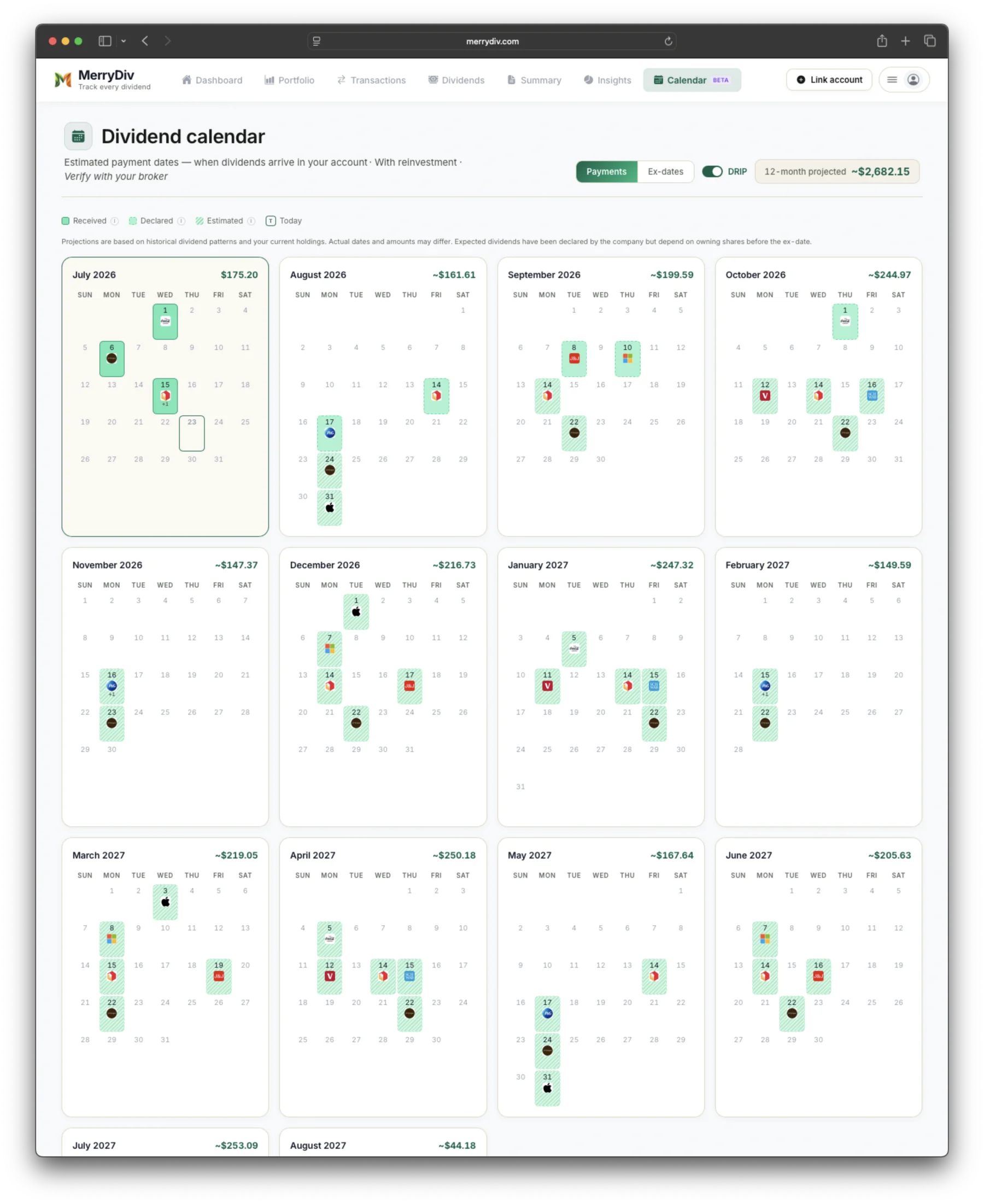
A calendar view of recorded payments and estimated upcoming dividends. Available with a subscription.
How Fidelity reports dividends (and what a dedicated tracker adds)
Fidelity provides dividend history and income estimates. Its account statement guide describes estimated cash flow over the next rolling 12 months for eligible securities. MerryDiv adds a dedicated view across the accounts you track, including other brokerages:
- One income view across brokerages. Combine recorded Fidelity dividends with payments from other connected or manual accounts. Explore estimated upcoming income alongside the payments you have already received.
- Cross-account rollup. While Fidelity lets you manage multiple accounts under one login, analyzing dividend income across taxable accounts, IRAs, HSAs, and other account types can require switching between views rather than providing a dedicated portfolio-wide dividend dashboard. Multi-account households (your accounts + spouse's + an inherited IRA, all under the same login) tend to feel this most.
- Yield on cost vs. current yield. Fidelity displays the current dividend yield of each holding but not your yield on cost — the yield your position is producing based on what you actually paid for it. For a dividend investor who bought JNJ 10 years ago at $65, the difference between the two is the whole point.
How dividend reinvestment (DRIP) shows up
For eligible securities, Fidelity allows dividends to be automatically reinvested through its dividend reinvestment program (DRIP), with enrollment configurable per account and per security. When a dividend reinvests, Fidelity generally records both the dividend payment and the corresponding reinvestment purchase as separate transactions. When Plaid exposes both, they land in your MerryDiv transaction feed — the dividend counts toward your dividend income totals, and the reinvestment purchase updates your share count and cost basis so downstream yield-on-cost math stays accurate. The two rows aren't visually merged into a single "reinvested at $X.XX" line — both remain available in your transaction history for review.
Tips for organizing multiple Fidelity accounts
Fidelity's account-selector treats each account (Brokerage, Roth IRA, Traditional IRA, HSA, 401(k), Cash Management) as a distinct view. Two habits worth building:
- Use identical positions across accounts intentionally. Holding SCHD in both your taxable brokerage and Roth IRA is fine — but track the cost basis separately (Roth is tax-free forever, taxable takes a haircut). MerryDiv keeps the per-account cost basis clean while showing a combined dividend total, so you get both views without maintaining two spreadsheets.
- Watch SPAXX/FDRXX in cash-heavy accounts. Fidelity's default cash sweep is a money-market fund that pays monthly. If you keep a significant cash balance in SPAXX or FDRXX, the monthly distributions can represent a meaningful portion of your investment income. Include it in your dividend view (MerryDiv does this by default) — otherwise your projections underestimate real income.
Fidelity tools and statements vs. MerryDiv
Where the built-in dashboard is enough — and where a dedicated tracker adds value.
| Feature | Fidelity tools and statements | MerryDiv |
|---|---|---|
| Historical dividend list | ✓ | ✓ |
| Forward income estimates | ✓ | ✓ |
| Dividend view across connected and manual brokerages | Fidelity account views | ✓ |
| Yield on cost | ✗ | ✓ |
| Upcoming ex-dividend + payment calendar | Limited | ✓ |
| SPAXX / FDRXX cash sweep income | Separate view | Typically in dividend stream (per Plaid) |
| Dividend growth history (5y, 10y) | ✗ | ✓ |
| Payout ratio + safety indicators | ✗ | ✓ |
| Multi-broker consolidation | ✗ | ✓ |
| Export to CSV | Limited | ✓ |
How to connect Fidelity in MerryDiv
- 1Create a free MerryDiv accountEmail + password only — no credit card required.
- 2Choose a subscription, then connectChoose a paid plan to enable brokerage sync, then open the Plaid picker. Eligible new subscribers can use a 14-day trial. Search for your institution by name or logo.
- 3Select Fidelity and sign inYou authenticate on Fidelity's page through Plaid. Your credentials never touch MerryDiv.
- 4Choose which accounts to importSelect the brokerage and retirement accounts offered for your login in Plaid. Account availability, including workplace plans and HSAs, depends on your institution and plan. Unavailable accounts can be tracked manually.
- 5Dividends start syncing automaticallyHistorical transactions import within a few minutes; future dividends land within 24 hours of hitting your Fidelity account.
How to track Fidelity dividends without a spreadsheet
The spreadsheet approach — copy the Income tab, paste into Google Sheets, format — works fine until you have more than one Fidelity account or start reinvesting. After that, it's a maintenance job. Connecting Fidelity through Plaid (any dividend tracker that supports Plaid, including MerryDiv) automates the import: dividends land in the dashboard within 24 hours of hitting your Fidelity account, cost basis stays accurate through DRIP, and the running annual-income projection updates automatically when you add or sell a position.
Fidelity SPAXX dividends — how to track them
SPAXX (Fidelity Government Money Market Fund) accrues daily and pays monthly. On the Fidelity Income tab it shows up as a single monthly line at the end of each month — easy to miss because it doesn't look like an equity dividend. When Plaid classifies those distributions with a dividend subtype (as money-market fund distributions typically arrive), MerryDiv includes them in your monthly dividend total alongside equity payments. If you keep a significant cash balance, SPAXX and FDRXX distributions can represent a meaningful portion of your monthly income and should be visible in any income projection.
Dividend ETFs Fidelity investors often track
Fidelity offers commission-free trading on essentially every U.S.-listed ETF, so your choice isn't constrained by broker. Five dividend ETFs frequently discussed in dividend-investing communities — different strategies, different profiles:
| ETF | Yield | Payout | Category |
|---|---|---|---|
| SCHD | 3.42% | Quarterly | Dividend-growth screen (quality + 10+ year payment history) |
| VYM | 2.68% | Quarterly | Broad high-dividend-yield exposure (yield-weighted) |
| JEPI | 7.85% | Monthly | Covered-call income ETF (distributions include option premium, not just qualified dividends) |
| VIG | 1.72% | Quarterly | Long-term dividend-appreciation screen (10+ years of increases) |
| FXAIX | 1.24% | Quarterly | Fidelity S&P 500 index mutual fund (broad-market, not a dividend-specific screen) |
Yields as of July 2026 and change frequently. This list reflects funds commonly discussed in dividend-investing communities, not MerryDiv user data. Educational examples only — not investment advice or a recommendation to buy any specific security.
Fidelity dividend history — how far back can you see?
Fidelity's own Income tab typically shows the last few years of dividend transactions on-screen, with older history available in the Statements & Documents section (annual 1099-DIV going back further). MerryDiv imports whatever Plaid exposes — usually a similar multi-year window — and keeps it available continuously going forward, so your dividend timeline builds up over time as you use the app. For older dividends needed at tax time, Fidelity's monthly statements remain the authoritative source.
Look beyond the funds in your account
Different funds can own the same companies. See your estimated company exposure across direct stocks and supported ETFs and mutual funds, and discover overlapping holdings across your accounts.
Portfolio X-Ray is included with every MerryDiv subscription on web and iOS. Coverage and holdings dates vary by fund.
Frequently asked questions
Track your dividends free
Subscribe to connect your brokerages and see payments in one dashboard. Manual tracking is free, with no credit card required.
Get started for free